802.1X Concepts
802.1X is the IEEE standard for port-based network access control. Before a device gets network access, it must authenticate.
The Three Players
| Role | Function | Examples |
|---|---|---|
Supplicant |
The client requesting access |
Linux workstation, Windows laptop, printer |
Authenticator |
The network device controlling access |
Switch, wireless access point |
Authentication Server |
Validates credentials, makes policy decisions |
Cisco ISE, FreeRADIUS, Microsoft NPS |
Authentication Flow
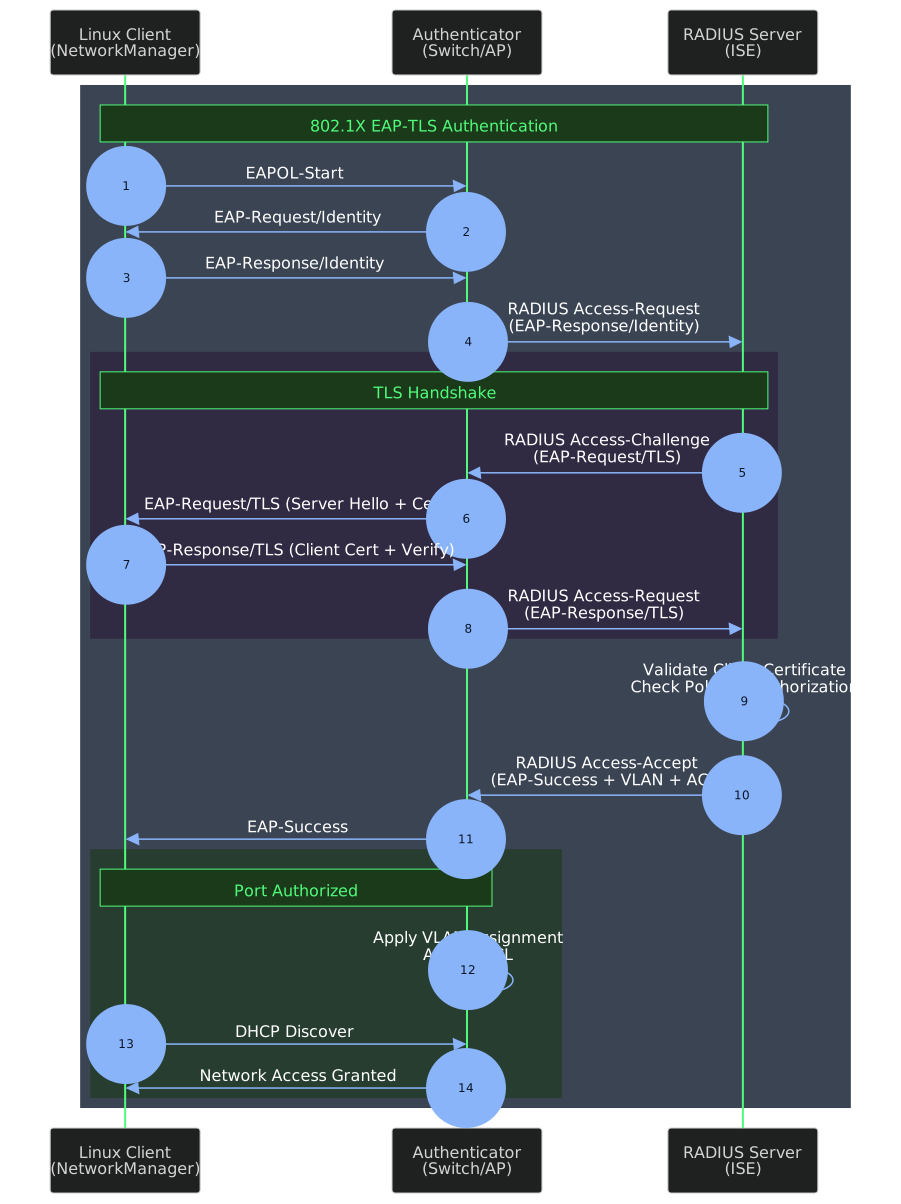
The authentication sequence:
-
EAPOL-Start — Client initiates authentication
-
EAP-Request/Identity — Switch asks for identity
-
EAP-Response/Identity — Client provides identity (certificate CN or SAN)
-
RADIUS Access-Request — Switch forwards to authentication server
-
TLS Handshake — Mutual certificate exchange and validation
-
RADIUS Access-Accept — Server approves with VLAN/ACL assignments
-
EAP-Success — Port authorized, network access granted
EAP Methods Compared
Not all EAP methods are equal. Choose based on security requirements.
| Method | Client Cert | Server Cert | Credentials | Security Assessment |
|---|---|---|---|---|
EAP-TLS |
Yes |
Yes |
None (cert-based) |
Strongest. Mutual authentication. No passwords to steal. |
PEAP-MSCHAPv2 |
No |
Yes |
Username/password |
Common but weaker. Password hashes can be cracked. |
EAP-TTLS |
Optional |
Yes |
Username/password |
Similar to PEAP. Tunneled authentication. |
EAP-FAST |
Optional |
Yes |
PAC or password |
Cisco proprietary. PAC provisioning complexity. |
MAB |
No |
No |
MAC address |
Not EAP. Fallback only. Trivially spoofed. |
Why EAP-TLS?
EAP-TLS is the only method that eliminates password-based attacks entirely.
Advantages
-
Mutual authentication — both client and server prove identity via certificates
-
No passwords — nothing to phish, crack, or stuff
-
Device identity — certificate binds to specific machine
-
Instant revocation — compromised cert revoked in seconds
-
Meets compliance — required by many security frameworks
Certificate Requirements

Server Certificate (RADIUS)
The authentication server presents this certificate to prove its identity.
| Attribute | Requirement |
|---|---|
Subject |
FQDN of RADIUS server |
SAN |
DNS name of RADIUS server |
EKU |
Server Authentication (1.3.6.1.5.5.7.3.1) |
Key Usage |
Digital Signature, Key Encipherment |
Validity |
1-3 years typical |
VLAN Assignment
After successful authentication, the RADIUS server can push attributes to the switch:
| Attribute | Purpose |
|---|---|
Tunnel-Type |
VLAN (value: 13) |
Tunnel-Medium-Type |
802 (value: 6) |
Tunnel-Private-Group-ID |
VLAN ID or name |
Filter-Id |
ACL name to apply |
Cisco-AVPair |
Vendor-specific (dACL, SGT, etc.) |
This enables dynamic segmentation — the network decides where to place the device based on identity, not physical port.
Linux Supplicant Options
| Tool | Use Case | Notes |
|---|---|---|
wpa_supplicant |
Direct control, systemd integration |
Most flexible. Required for EAP-TLS wired. |
NetworkManager |
Desktop convenience |
Uses wpa_supplicant backend. Good for GUI. |
systemd-networkd |
Server/minimal systems |
Limited 802.1X support. Avoid for EAP-TLS. |
For EAP-TLS on Linux, wpa_supplicant is the foundation regardless of which front-end you use.